Kizing: Bundle & Kit Stock
The mug sold out.
The gift box with the mug kept selling.
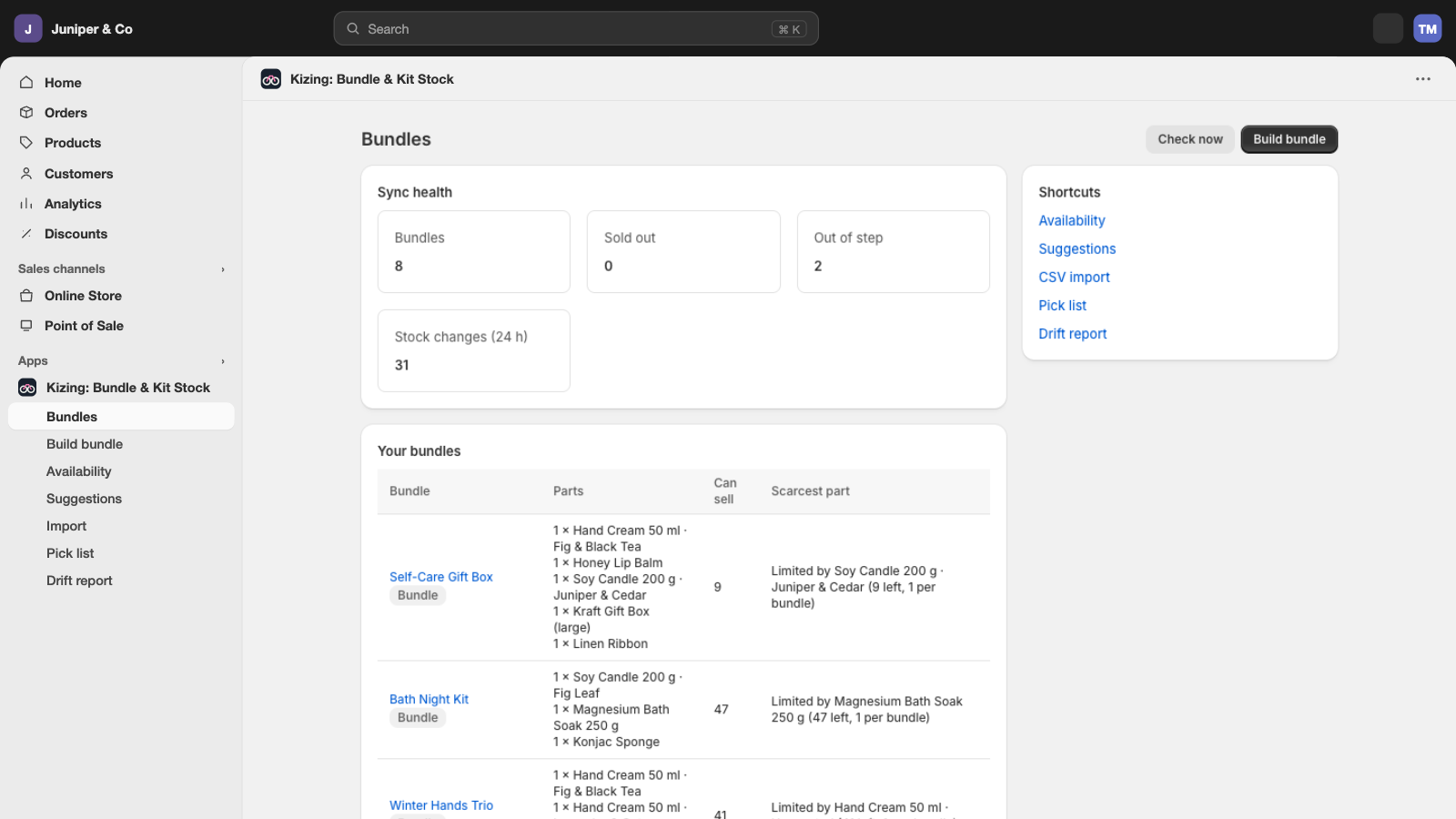
Bundle & Kit Stock keeps every bundle, kit and multipack tied to the products inside it. A bundle shows only as many as its scarcest part allows, and every sale, return or restock of a part updates the bundles that use it, in your online store, on POS and on every channel that reads Shopify stock.
Why bundles oversell
Shopify counts stock per variant. A gift box is its own product with its own number, so when the mug inside sells out on its own, the gift box still says 14 and keeps selling. Someone finds out when the order can't be packed.
Most stores patch this by hand: lower the bundle when a part runs low, raise it after a delivery, and hope nobody sells the last mug on another channel in between. Every extra channel makes the gap wider.
How it works
Tell Kizing what's inside
Pick the products in each bundle and how many of each it takes. The setup assistant also suggests bundles it finds in your catalog, and a spreadsheet import handles hundreds at once.
The scarcest part sets the number
Each bundle shows what its components allow, location by location: a gift box of one mug and two coffee bags, with 14 mugs and 60 bags, shows 14.
Sell a part anywhere
Sell three mugs on POS and the gift box drops to 11 everywhere. Sell a gift box and the mug and coffee bags go down with it.
Returns, cancels and the hourly check
Cancelled and refunded bundles put their parts back. Every hour Kizing compares each bundle with its parts and fixes any that drifted.
What it does
Fixed bundles, kits and multipacks that keep component stock in sync on every channel you sell on.
Bundles, kits and multipacks from products you already have
A bundle is built from existing products and variants. Give it any number of components and any quantity of each.
How it worksBundle stock is what its scarcest component allows
For each location, Kizing divides each component's stock by the units the bundle needs and takes the smallest result. That number goes on the bundle.
How it worksSelling a component lowers every bundle that uses it, and the reverse
One component can sit in many bundles. Each sale, from any channel, draws on the same stock and updates every bundle that needs it.
How it worksReturns, cancellations and restocks flow back
A cancelled or refunded bundle puts its components back, never more than the order took. A delivery of mugs raises every bundle that was waiting on mugs.
How it worksBundles stay real Shopify products
Kizing writes the bundle's stock to the bundle product itself, so the online store, POS, marketplaces and social channels all read the right number. No checkout script, no theme change.
How it worksMultipacks from one variant
A 6-pack takes six units of one variant: 120 cans in stock means the 6-pack shows 20.
How it worksAn hourly check that fixes drift
If a bundle's number stops matching its components (a manual edit, another app, a missed update), the hourly check sets it right and logs why.
How it worksA ledger of every change
Which order, which bundle, which component, at which location, from which channel. You can always see why a number moved.
How it worksAlerts before a bundle sells out
Pick a number and Kizing tells you when a bundle can sell that many or fewer, and which part runs out first, so you reorder the right thing. Each bundle is named once, not every hour.
How it worksA pick list of parts to pack
Open orders with bundles still to ship, each bundle broken into the parts that go in the box, kits inside bundles included. Download it as CSV for your packers or a 3PL that stocks the parts.
How it works
You see every number before it changes
Bundle math touches stock you sell elsewhere, so Kizing shows its work first and refuses changes that can't be right.
- Bundles checked
- 12
- Already right
- 9
- Will change
- 3
- Can't be built
- 0
Example from a demo store: "Gift box shows 9 at Warehouse, components allow 7". You see every bundle, location by location, before anything is written.
A dry run before you turn a bundle on
Setup lists each bundle with the stock Shopify has for it now and what its components allow, location by location. Nothing is written until you confirm.
Never resets your product stock
Kizing never sets a component's stock to a number. Parts only move by what each order took or gave back, and only bundle products get a number written.
Never takes a component twice
Each order line is recorded in the ledger when its parts are taken. If Shopify sends the same order again, the parts are not taken again.
Never restocks more than it took
A refund or cancel puts back at most what that order line took from each component.
Doesn't overwrite a sale in progress
Bundle stock is written only if Shopify still holds the number Kizing read. If a sale landed in between, it reads again and retries.
Refuses bundles that can't exist
A bundle that contains itself, two bundles that contain each other, or a component that was deleted from Shopify is stopped with a plain explanation.
Works with every channel, through one ledger
Because bundles stay ordinary Shopify products with a stock number, any channel that reads Shopify stock sees the right count: your online store, Shopify POS, marketplaces and social shops. Other Kizing apps write to the same ledger, so when Supplier Stock Feeds updates mug stock from a supplier file, the gift box follows right after. See Supplier Stock Feeds
The app and support speak English, German, French, Spanish, Italian, Dutch, Polish, Czech, Japanese, Portuguese (Brazil), Indonesian, Vietnamese, Thai and Malay.
Questions
Does it work with marketplaces and social channels?
Yes. A bundle is a normal Shopify product with its own stock count, which Kizing keeps equal to what the components allow. Any channel that reads Shopify stock sees the right number.
What happens when one component sells out?
Every bundle that needs it goes to zero at once. The other components stay available on their own.
Can a component be in several bundles?
Yes. A component can sit in as many bundles as you like; each sale draws on the same stock.
What happens if I uninstall?
Your bundles stay as normal products with the stock they had. Nothing is deleted. Bundle stock simply stops following the components.
Are there order limits?
No plan has an order limit.
Will I know before a bundle sells out?
Yes. Pick a number, and after each hourly check Kizing tells you which bundles can sell that many or fewer and which part runs out first. Each bundle is named once when it crosses the line, not every hour.
Does my warehouse or 3PL see what to pack?
The order keeps the bundle line, as the shopper bought it. The pick list shows every open order's bundles broken into the parts to pack, kits inside bundles included, and downloads as CSV for packers or a 3PL that stocks the parts.
Can I edit many bundles at once?
Export your bundles to CSV on any plan, change them in a spreadsheet and import the file back (Plus). Bundle stock follows the new parts as soon as the import finishes.
Do I have to change my products or theme?
No. A bundle is a Shopify product with its own SKU; its components are variants you already sell. Kizing only keeps the bundle's stock number right.
Can a bundle contain another bundle?
Yes, from Starter. A component can be another bundle; Kizing counts down to the real parts and refuses bundles that would contain each other.
Does my 3PL see what to pack?
The order keeps the bundle line as the shopper bought it. The pick list breaks every open order's bundles into the parts to pack and downloads as CSV for your packers or 3PL.
Which location does a bundle sale take parts from?
The location the order is fulfilled from. If Shopify doesn't say, Kizing uses the location you choose in settings.
Stop counting bundle parts by hand.
Free for 3 bundles, with every order. Setup shows each bundle's number before anything changes.
Add to ShopifyNot on the Shopify App Store yet. This button will open the listing once it is approved.