Kizing: Supplier Stock Feeds
Your supplier emails a stock file.
Your store keeps selling what they don't have.
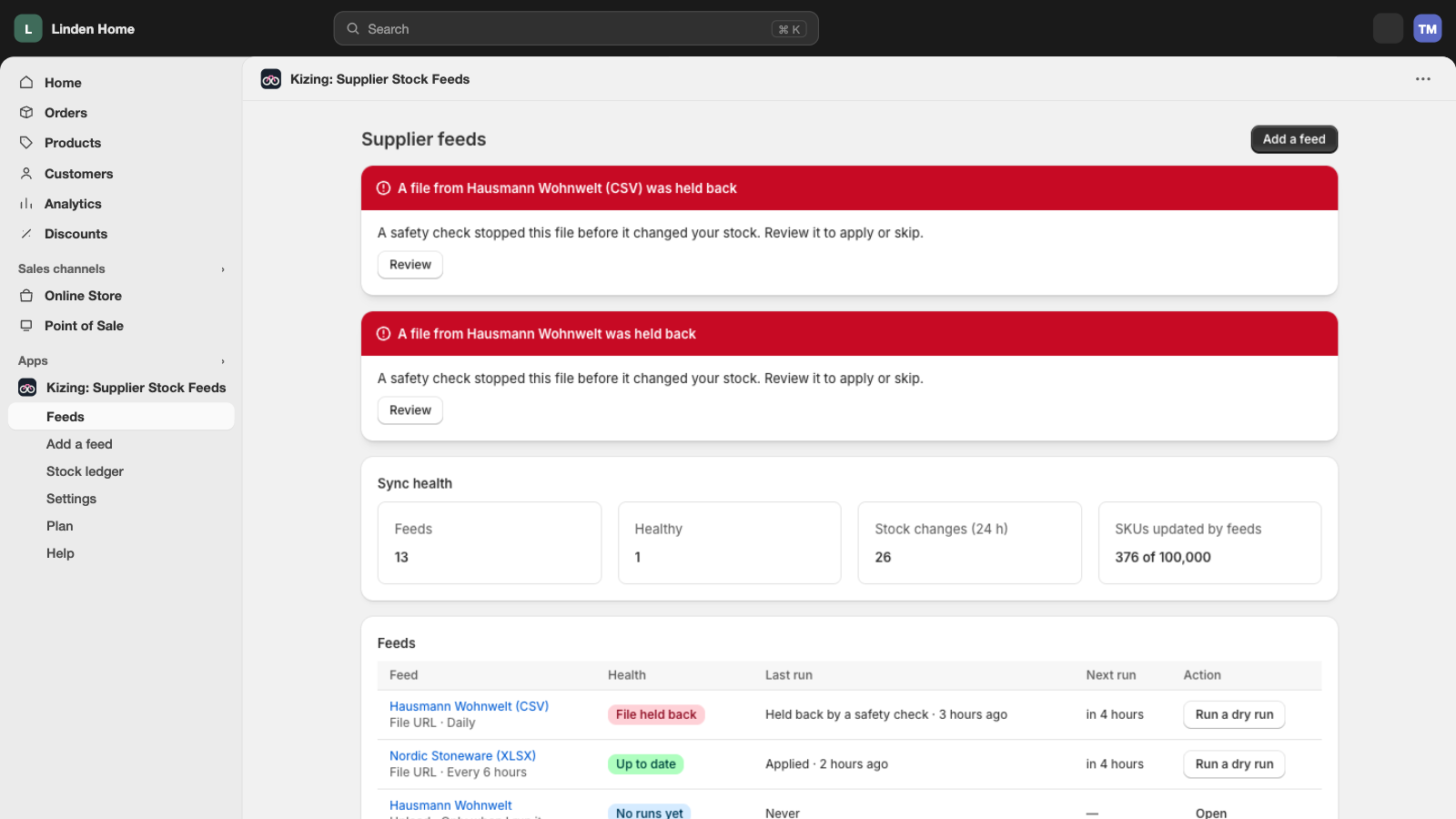
Supplier Stock Feeds reads your suppliers' stock files and updates Shopify on a schedule. A setup agent maps the columns, every file gets a dry run, and a file that is stale, cut short or would zero a large share of your products is held instead of applied.
Why supplier stock goes wrong
Suppliers send stock however suits them: an emailed spreadsheet twice a week, a CSV on an FTP server, a link that changes name every morning. Columns are called "Artikelnummer" and "Bestand", stock is written as "In stock", ">10" or "ausverkauft", and nobody warns you when the layout changes.
Copying that into Shopify by hand is slow, so stores sell what the supplier no longer has. Automating it is worse when the file is wrong: a half-uploaded file can set thousands of products to zero overnight.
How it works
Point Kizing at the file
A URL, FTP, SFTP, a Google Sheet, an upload, or a feed-only email address your supplier sends the file to. One feed per supplier.
The setup agent maps the columns
It reads the first file, picks the SKU or barcode column and the stock column, and shows you what it picked and how sure it is. You confirm or change it.
See the dry run
Every change the file would make, product by product: how many go up, down and to zero, and which rows match nothing in Shopify.
Runs on schedule, checked every time
From daily (Starter) to every 15 minutes (Scale); Free runs when you press the button. Each run passes four safety checks before it touches stock; one that fails is held and you are told why.
What it does
Update stock, prices and cost from supplier files. Preview every change, then sync on a schedule.
CSV, XLSX and XML, one feed per supplier
Plus TSV, JSON and ZIP archives. Any common delimiter, UTF-8, UTF-16 or Windows-1252, and spreadsheets with title rows above the header.
How it worksURL, FTP, SFTP, Google Sheets or a feed-only email address
Or upload a file by hand. Each feed can have its own inbound address so suppliers who only email a spreadsheet still work.
How it worksA setup agent maps SKU and stock columns
It reads column names and sample rows, suggests the mapping and shows its confidence. You confirm before the first run.
How it worksDry run: every change before it goes live
Each run starts as a preview. Apply it by hand, or let runs apply themselves when every safety check passes.
How it worksHolds a stale file
If the file hasn't changed for 3 days, the run is held instead of re-applying old numbers.
How it worksHolds a truncated file
If a file has less than half the rows of the last good one, or would drop more than 30% of matched products to zero, nothing changes.
How it worksAlerts in the app, by email or on Slack
When a feed is held, can't be fetched, can't be read or goes quiet. Email on every plan, Slack on Expert and Scale. Your Shopify stock is left as it was.
How it worksA run log for every file
What each run changed, what it skipped and why: unknown SKUs, unreadable quantities, duplicate rows.
How it works
Checked before it touches your stock
The guards and the dry run are on every plan, including Free. They are the point of the app, not an upsell.
Held Bergmann GmbH · 06:02
The file has 412 rows, 7% of the last good run's 5,830. Nothing was changed.
Dry run on every feed
See each change a file would make, with totals for up, down and to zero, before anything is applied.
Truncated-file guard
A file with less than 50% of the last good file's rows is held. A half-finished upload never becomes your stock.
Mass-zero guard
If more than 30% of the matched products would drop to zero, the run is held until you look.
Stale-file guard
A file that hasn't changed for 3 days is held, so yesterday's numbers don't keep overwriting today's sales.
Doesn't overwrite a sale in progress
Stock is written only if Shopify still holds the number Kizing read. Products that sold mid-run are retried on the next run.
Works with your bundles and every channel
Supplier Stock Feeds writes Shopify stock, so every channel that reads Shopify sees it. Each change goes into the same stock ledger as the other Kizing apps: if a feed updates a product that is part of a bundle, Bundle & Kit Stock recalculates the bundle right after. See Bundle & Kit Stock
The app and support speak English, German, French, Spanish, Italian, Dutch, Polish, Czech, Japanese, Portuguese (Brazil), Indonesian, Vietnamese, Thai and Malay.
Questions
My supplier only emails the file. Does that work?
Yes. Each feed can get its own email address. Ask your supplier to send the file there, or forward it yourself, and Kizing reads the attachment on arrival.
The columns in my supplier's file are messy. Will it understand them?
The setup agent reads a sample file, finds the SKU and stock columns and shows you what it picked. You confirm or change the mapping before the first run. If the supplier changes the layout later, the run is held and you are asked.
What stops a bad file from wiping my stock?
Before each run Kizing checks the file's date, its row count against the last good file, and how many products it would set to zero. If any check fails, nothing changes and you get an alert explaining which check failed.
Which Shopify location does a feed update?
The one you choose per feed. If the supplier's file lists stock per warehouse, map each warehouse to a Shopify location; warehouses sent to one location are added up.
Does it change prices or create products?
It updates products already in Shopify, matched by SKU or barcode: stock, cost and, with your price rules, selling and compare-at prices. Every change shows in Preview sync first. It doesn't create products yet.
A run went wrong. Can I undo it?
Yes. Undo the latest run: each product moves back by what the run changed, so sales made since still count.
My supplier's file has brands I don't sell.
Add a filter such as "Brand is Acme", or tag products the feed must never change. Neither is ever set to 0 as missing.
What happens to products that disappear from the file?
You choose per feed: leave their stock as it is (the default) or set it to 0. Products themselves are never edited: the app only has permission to change stock.
My supplier writes "In stock" instead of a number.
Common words in English, German, French, Spanish, Italian and Dutch are understood out of the box ("lieferbar", "ausverkauft", "op voorraad"). You set what number "in stock" means and can add your own words.
Can I hold some stock back?
Yes. Each feed has a safety buffer, a case-pack multiplier for suppliers who count cases, and an optional cap.
A run went wrong. Can I undo it?
Yes. Undo the latest applied run from its page: every product moves back by what the run changed, so sales made since still count. Scheduled and emailed feeds pause so the next file doesn't apply it again.
My supplier's file has other brands I don't sell.
Add a filter, such as "Brand is Acme", and the feed uses only those rows. You can also tag products the feed must never change. Rows and products left out are never set to 0 as missing.
Let the supplier's file update your stock, safely.
Free for one feed, with every guard and dry run. Paid plans from $7, $1 for the first 30 days.
Add to ShopifyNot on the Shopify App Store yet. This button will open the listing once it is approved.